Single
$9.90
One video, to see how it looks.
- 100 credits
- 1 standard video
- Credits valid for 12 months
- Failed videos refunded automatically
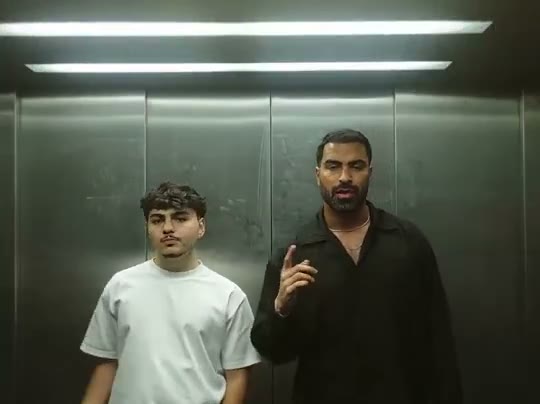
Upload two photos and the AI puts you both in the viral Sampagne elevator edit: one waits in the steel lift, the other steps in past the camera and spins around, and you both hold a straight face at the lens to “365”. Two photos, 14 seconds, song included, nothing to install.

The one who waits
Replaces the black shirt, right

The one who walks in
Replaces the white tee, left
Group photos won't work. One person or pet per photo, face clear, waist up or longer: the clip shows you both from the thighs up. Photo 1 is already in the elevator. JPG, PNG or WebP.
Quality
The elevator duo edit every video recreates, set to “365” by Sampagne: the first is already inside, the second steps in and spins around, then both keep a straight face at the lens. Your two photos play both parts.
The 365 elevator scene is one fixed 14-second shot in a brushed-steel lift: a wait, a walk-in, a turn, a few glances and two blank faces. Your two photos play both parts.
| Time | What happens |
|---|---|
| 0–1 s | Photo 1 stands alone in a brushed-steel elevator under two strip lights, calm, fixing their shirt. |
| 1–2.5 s | Photo 2 walks in right past the camera, back to the lens, and steps to the left. |
| 2.5–4 s | Photo 2 turns around, touches their hair and glances at a phone. |
| 4–10 s | Side by side: a sideways look, a hand to the face, a small shrug of a gesture. |
| 10–14 s | Both settle and stare straight into the camera, deadpan, while “365” plays. |
Also called: 365 elevator trend · 365 Sampagne AI elevator video · Elevator 365 Sampagne AI video trend · 365 edit · 365 elevator scene · Sampagne elevator edit · 365 Tage edit.
Add two photos, the one who waits and the one who walks in, and press Generate. The steel elevator, the walk-in, the stare and the song are already in the clip.
Photo 1 is already standing in the lift when the clip starts. Photo 2 steps in a second later. Waist-up or longer shots work best, because the clip frames you both from the thighs up.
Standard 480p uses 100 credits, HD 720p 200 and Full HD 1080p 600. The elevator, the walk-in, the timing and the song are already in the clip, so there is no prompt to write.
The render takes a few minutes and waits under “My videos” with the song “365” on it. The MP4 is 4:3 like the original edits, ready for TikTok, Instagram Reels or YouTube Shorts.
Mostly pairs who want the Sampagne elevator edit without finding an empty elevator, a tripod and a friend who keeps a straight face.
The 365 edit is funniest when the pair does not match: the tall one and the short one, the suit and the tracksuit.
A 14-second clip of the two of you sharing a lift and refusing to react, set to a song about 365 days.
Put your dog or cat in photo 2 and it walks into the elevator on its own, then stares down the camera with you.
Buy credits once, use them on any tool within a year. Failed videos are refunded.
$9.90
One video, to see how it looks.
Most popular
$19.90
Try it with a few clips.
$49.90
For you, your friends and a few retakes.
$89.90
For creators posting the trend every week.
An AI generator recreates the whole 14-second elevator clip from two photos. A CapCut template animates your photos inside its own effect. Filming it yourself needs a real elevator and good timing.
| Option | What you need | What you get | Best for |
|---|---|---|---|
| Burning Bridges AI (this page) | Two photos | The 14 s elevator edit with you two in it, song included | A finished duo edit in minutes, with no app and no prompt |
| A CapCut template | The CapCut app, a template link and two photos | A templated photo-to-video edit with the sound | People who already edit in CapCut and like its effects |
| Film it in a real elevator | A lift, a phone on a fixed spot and a friend | A real clip, as good as your timing | People with a quiet, well-lit elevator nearby |
| A video model with a reference clip | The elevator clip, two photos and a prompt you write | A recast clip, after some prompt tuning | People who already use tools such as Kling O3’s video edit mode |
The 365 Sampagne elevator trend comes from German TikTok in November 2026: AI-made duo edits filmed in one brushed-metal lift, with “365” by Sampagne as the sound.
The song is “365” by Sampagne, who posts on TikTok as @sampagnebaby. Sampagne announced 12 November 2026 as the release date and posted “song gehört jetzt euch” (the song is yours now) that day. The chorus line “365 Tage bin ich für dich da” means “I’m there for you 365 days”.
The elevator format took off on the German account @neoausdermatrix33, which posts AI-made pairs of celebrities and TV characters in the same steel elevator, each captioned “wen wollt ihr als nächstes?” (who do you want next?). Its posts of 20, 21 and 22 November 2026 passed 1.6, 1.8 and 2.1 million views. By 25 November the #365elevatortrend tag held about 375 videos and 1.5 million views, most of them tutorials for the elevator 365 Sampagne AI video. The celebrity versions are AI: the people in them never met in that elevator.
Where the trend came from, and how to get the best video out of it.
One credit balance works for every trend. Pick another clip and star in that one too.
Last updated . Credit prices and clip length are read from the generator itself.
Two photos in, a finished 365 elevator edit out, song included, in a few minutes.