Burning Bridges AI logo

Flamingo Float AIVideo Generator

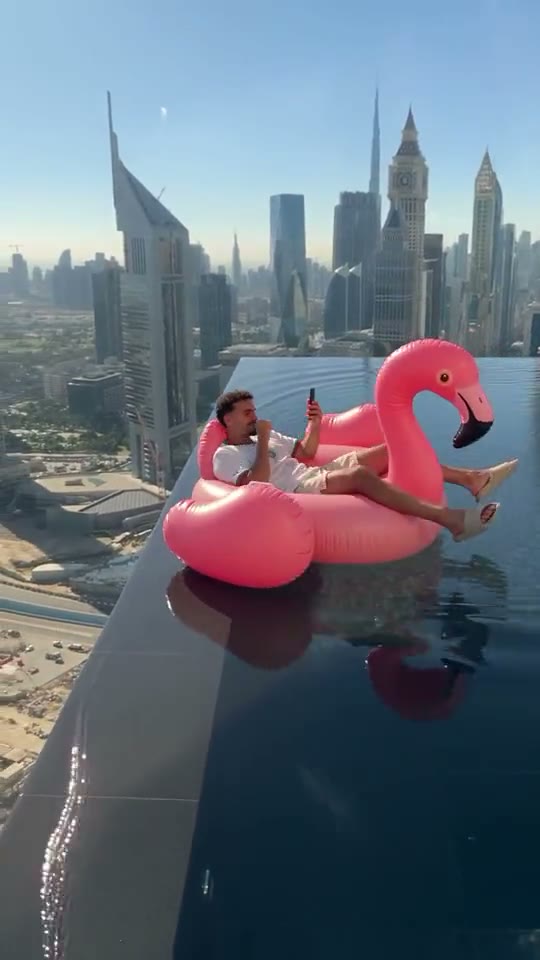
One photo in. Flamingo Float AI puts you on the giant pink flamingo in the viral rooftop infinity pool — phone in hand, Dubai skyline below — as a friend’s hand reaches in, misses, and you drift away along the edge without a care.

  • 1 photo
  • People or pets
  • 11-second rooftop drift
  • No prompt

Make your rooftop pool float video

The one on the float in the example video

The one on the float

Replaces the white T-shirt

Group photos won't work. One person or pet, face clearly visible, waist up or full body, good light. JPG, PNG or WebP.

Quality

The rooftop drift every video recreates, move for move: the flamingo, the infinity edge, the hand that misses. You add the one on the float.

What is the flamingo float trend?

Someone chills on a giant pink flamingo in a rooftop infinity pool, a friend reaches in to grab it, and the float drifts off along the edge while the rider stays perfectly relaxed. AI versions that put anyone on the flamingo took off on TikTok in November 2026.

  1. 0 to 3 s

    Living the life

    A rooftop infinity pool high above the Dubai skyline. Someone lounges on a giant pink flamingo float, legs out, scrolling their phone, right next to the glass edge.

  2. 3 to 5 s

    The hand

    A hand reaches in from behind the camera to grab the float. It does not get there. Nobody on the flamingo looks up.

  3. 5 to 11 s

    The drift

    The float slides along the infinity edge, smaller and smaller, all the way to the far end of the pool, with the whole city below.

Also called: Flamingo float AI · Flamingo floatie AI · Flamingo float trend · Flamingo TikTok trend · Giant flamingo float · Infinity pool edge trend · Hey bro, thank you.

How to make a flamingo float AI video

No prompt to write and no template to find. The rooftop pool, the flamingo and the drift are built in.

  1. 1

    Add your photo

    One clear photo of the person or pet who should ride the flamingo. They replace the man in the white T-shirt; the pool, the skyline, the float and the hand stay as in the original.

  2. 2

    Press Generate

    Pick Standard 480p for 100 credits, HD 720p for 200 or Full HD 1080p for 600. Every video is vertical like the original and 11 seconds long. The pool, the float and the drift are already loaded.

  3. 3

    Add a sound and post

    Rendering takes a few minutes and you can close the tab meanwhile. The video comes without sound, like the clip it recreates: add the trending flamingo sound or your own “bro… thank you” voice-over in TikTok, Reels or CapCut.

Photos that work best

  • One person or one pet in the photo, not a group shot.
  • Face the camera, face clearly visible, good light.
  • Waist up or full body: the clip shows you lounging head to toe.
  • You keep the outfit from your photo: summer clothes look closest to the original.
  • Only adults who agreed to appear. No minors or celebrities.

Pay per video, no subscription

Buy credits once, use them on any tool within a year. Failed videos are refunded.

Single

$9.90

One video, to see how it looks.

  • 100 credits
  • 1 standard video
  • Credits valid for 12 months
  • Failed videos refunded automatically

Most popular

Starter

$19.90

Try it with a few clips.

  • 300 credits
  • 3 standard videos
  • Credits valid for 12 months
  • Failed videos refunded automatically

Creator

$49.90

For you, your friends and a few retakes.

  • 900 credits
  • 1 Full HD video or 9 standard
  • Credits valid for 12 months
  • Failed videos refunded automatically

Pro

$89.90

For creators posting the trend every week.

  • 1800 credits
  • 3 Full HD videos or 18 standard
  • Credits valid for 12 months
  • Failed videos refunded automatically

Flamingo float video FAQ

Flamingo Float AI is an online generator for the flamingo float trend. Upload one photo and the AI recreates the clip move for move with you lounging on a giant pink flamingo in a rooftop infinity pool above the Dubai skyline, as a hand reaches in, misses, and you drift away along the edge. No pool, no float, no editing.

A short vertical clip: someone chills on a giant pink flamingo float in a rooftop infinity pool, a friend reaches in to grab it, and the float drifts off along the edge while the rider stays perfectly relaxed. AI versions that put anyone on the flamingo took off on TikTok in early November 2026.

Yes. Flamingo float AI, the flamingo floatie trend, the infinity pool edge trend and the “hey bro, thank you” clip are all names for the same video. It is not the older “Flamingo” song or Roblox trends that share the name.

That is the joke in the viral versions: the friend shouts “bro, bro!” as the float heads for the edge, and the rider, still on their phone, just answers “hey, thank you!” and keeps drifting. Many people add it as a voice-over or caption.

Upload one photo of yourself, a friend who agreed, or your pet, pick a quality and press Generate. The pool, the skyline, the float and the hand are built in, so there is no template or prompt to find. When the video is ready, download it, add a sound and post it.

No. Tutorials either use a CapCut template, where everyone gets the same clip, or a general AI video app with a long prompt about the float, the edge and the drift. Flamingo Float AI recreates the original clip with you in it, so you only add a photo.

No. It drifts along the glass infinity edge to the far end of the pool, exactly as in the original. It only looks like it is about to go over, which is the point.

No. The clip it recreates has no sound, so neither does your video. Add the trending flamingo float sound from the TikTok or Instagram library, or record your own “bro… thank you” over it in CapCut.

Yes. Upload a sharp photo of your pet with its face clearly visible, and it lies back on the float and drifts off along the edge, completely unbothered.

There is nothing to install: Flamingo Float AI runs in the browser on iPhone, Android and desktop, and you save the finished video to your camera roll. It is not free — each video costs credits, bought in one-time packs — but if a video fails, its credits are returned automatically.

A Standard 480p video uses 100 credits, HD 720p uses 200 and Full HD 1080p uses 600. Credits come in one-time packs from $9.90 — no subscription — and work for every tool on the site.

Most videos finish in a few minutes. You can leave the page — the video keeps rendering and waits in the studio. Finished videos stay there for 14 days, so download the ones you want to keep.

No. Everything in your video is generated by AI, the pool and the skyline included. It is a meme, not a holiday photo: do not use it to pretend you stayed somewhere or to sell anything.

Only with their permission. Do not upload photos of celebrities, public figures, or anyone who has not agreed — see the content standards in our Terms.

No. Flamingo Float AI is an independent tool for making your own take on the trend. It is not affiliated with, endorsed by, or connected to the creator of the original video, any hotel or pool, or any float brand.

Your rooftop drift is one photo away

Upload a photo, lie back, and let Flamingo Float AI take you to the edge.