Single
$9.90
One video, to see how it looks.
- 100 credits
- 1 standard video
- Credits valid for 12 months
- Failed videos refunded automatically
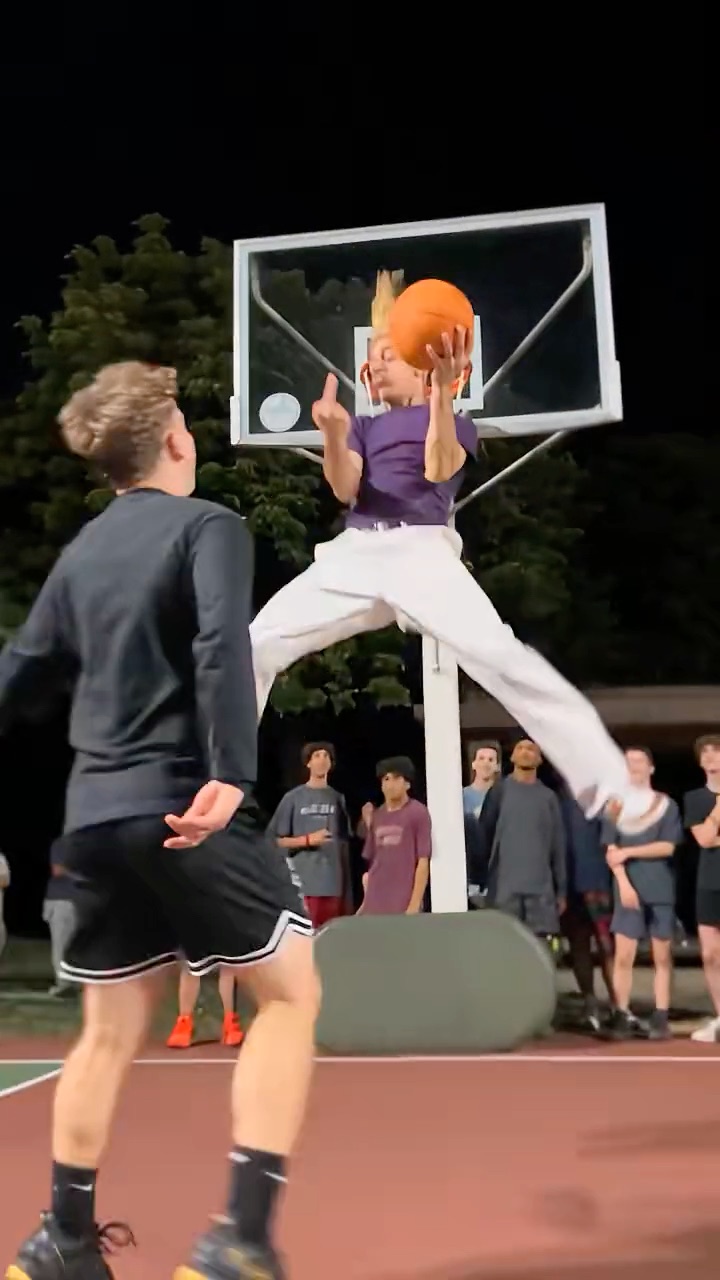
Two photos in. Middle Finger Dunk AI recreates the viral one-on-one dunk clip move for move with you dunking on your friend under the floodlights, finger and all — no court, no hops, no filming.
The dunker
Replaces the purple tee
The defender
Replaces the black tee
Group photos won't work. One person per photo, face clearly visible, waist up or full body, good light. The first photo dunks.
Quality
The one-on-one dunk every video recreates, move for move. You add the dunker and the defender.
A 16-second vertical clip from a packed outdoor court at night: one player dunks on his defender again and again, then turns to the camera and flips him off. People now remake it with AI, starring themselves as the dunker and a friend as the one getting dunked on.
0 to 5 s
One on one under the floodlights: the dunker drives past the defender, takes off and throws it down while the crowd lines the court.
5 to 11 s
Again and again: another drive, another flush, hanging on the rim over the defender’s head.
11 to 16 s
The dunker turns to the camera and holds up the middle finger while the defender walks off, hand over his face.
No prompt to write and nothing to edit. The court, the crowd and every dunk are built in.
One clear photo per player. The first becomes the dunker (the purple tee in the original), the second the defender who gets dunked on (the black tee).
Pick Standard 480p for 100 credits, HD 720p for 200 or Full HD 1080p for 600. Every video is vertical like the original and 16 seconds long. The court, the crowd and every dunk are already loaded.
Rendering takes a few minutes and you can close the tab meanwhile. The video comes with the original sound, ready for TikTok, Reels or Shorts.
Buy credits once, use them on any tool within a year. Failed videos are refunded.
$9.90
One video, to see how it looks.
Most popular
$19.90
Try it with a few clips.
$49.90
For you, your friends and a few retakes.
$89.90
For creators posting the trend every week.
Where the trend came from, and how to get the best video out of it.
One credit balance works for every trend. Pick another clip and star in that one too.
Upload two photos and let Middle Finger Dunk AI do the jumping.