How to Make a Need for Speed AI Video From One Car Photo: Generator, CapCut or Prompt
How to make a Need for Speed AI video from one car photo: a one-photo generator, a CapCut template or a prompt, plus the photo that works.
By Burning Bridges AI · Updated · 6 min read
What does a Need for Speed AI video look like?
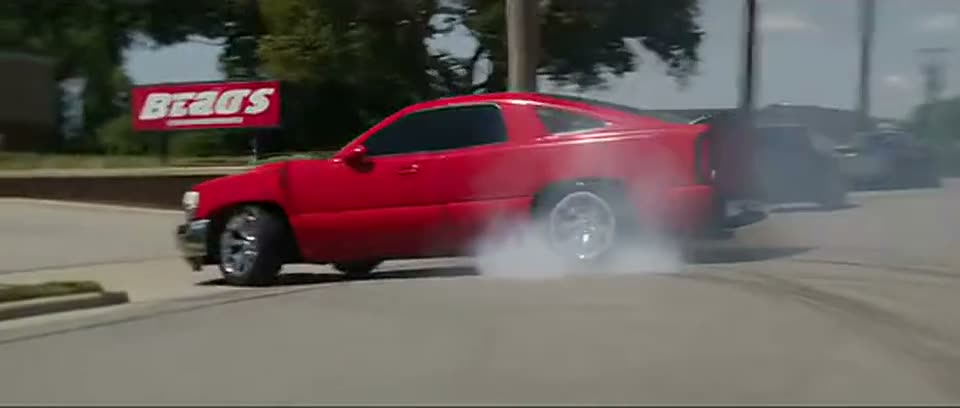
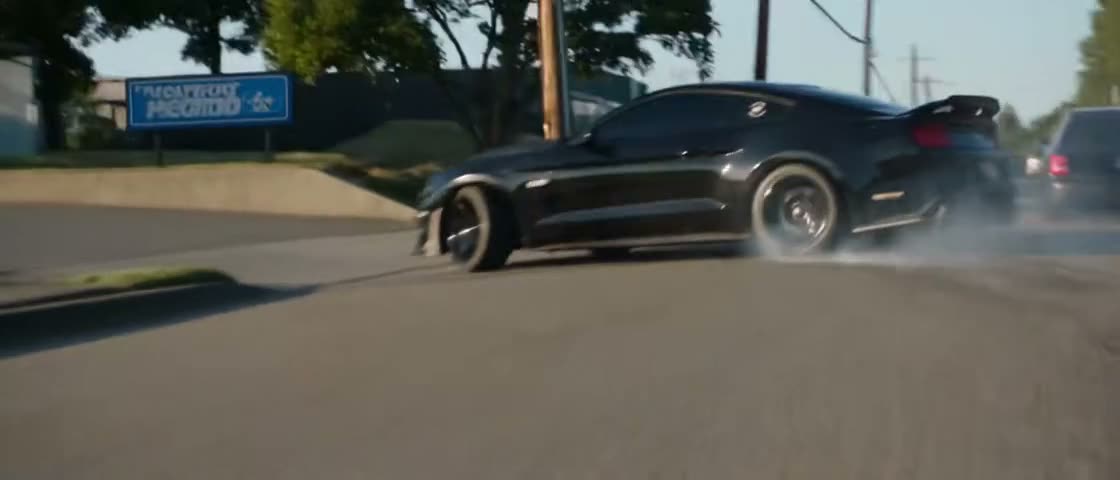
A Need for Speed AI video is a short car-movie scene with your own car as the hero. In the viral version, which runs about 15 seconds, the car rolls past a lawn, is filmed from inside a chasing car, swings out of a parking lot in a smoky burnout, slides past people leaning on a patio railing and drives off past a drive-thru. The trend is named after the Need for Speed racing games, and the clips copy their tire-smoke, chase-camera look.
If you want the background first, read what the Need for Speed AI trend is and why it changes trucks.
How do you take the right car photo?
The right photo shows the whole car from the front three-quarter angle or straight from the side, in daylight. Every route below copies the car from this one photo, so the photo decides how close the result looks to your car.
- Whole car in frame: bumper to bumper, wheels visible. A cropped photo makes the AI invent the missing part.
- Front three-quarter or side angle: these show the body shape, the wheels and the ride height at once. A front-only shot hides the length, which matters most for trucks.
- Daylight, no heavy filter: the trend scenes are sunny, and a night photo loses the paint color.
- Nothing in front of the car: no people, pets or other cars blocking the body.
- The original file: a photo straight from the phone camera, not a screenshot or a compressed copy from a chat app.
How do you make it with a one-photo car-swap generator?
A one-photo car-swap generator already holds the trend clip and the prompt, so you only upload the car photo and press generate. This is the fastest route and the one with the fewest failed tries.
- Open a Need for Speed AI generator and pick a scene, if it offers more than one.
- Upload the car photo.
- Pick a quality, generate, and wait a few minutes.
- Download the MP4 and post it.
Generators differ in length and shape. OpenFilmo’s Need for Speed AI trend template gives a 5-second vertical 9:16 clip, according to its trend page. The Need for Speed AI video maker on this site recreates 14- to 15-second scenes, with a separate scene built around a pickup truck.
How do you make it with a CapCut template?
Most TikTok tutorials for the trend use a CapCut photo-to-video template: you open the template, add the car photo and export. Tutorials for the trend were on TikTok by November 12, 2026.
- On TikTok, open a Need for Speed AI trend video that shows a CapCut template link above the caption.
- Tap the link to open the template in CapCut, or search the template name inside CapCut.
- Tap “Use template”, pick the car photo from your gallery and let CapCut render it.
- Export the video and post it from CapCut or your gallery.
CapCut templates vary a lot. Some generate real motion with AI. Others animate the still photo with zooms, shakes and transitions, so the car never actually drives. Watch the template’s preview before you use it.
How do you make it with a video model and a prompt?
The prompt route needs a video model that takes a reference video plus an image. You upload the trend clip as Video 1 and your car photo as Image 1, and the prompt tells the model to swap only the hero car. Kling O3’s video-to-video edit mode works this way. One Instagram creator made an NFS-style clip with GPT Image and Seedance 2.0, styling a still first and animating it second.
- Save the trend clip you want to copy, and trim it to the model’s maximum reference length.
- Upload the clip as the reference video and the car photo as the image.
- Paste the prompt below. Add the truck line if your vehicle is a pickup.
- Generate at the lowest resolution first. Raise it only when the car looks right.
- Lay the trend sound back on if the model returns a silent video.
The one-line prompt shared in TikTok tutorials only says to replace the main foreground vehicle and keep everything else, as needforspeedai.video quotes it. That short prompt does not say which source wins on body shape, so trucks often come out as the reference’s low two-door car. This longer prompt splits the job:
Recreate Video 1 shot for shot. Replace only the hero car, the one that does the burnout, with the vehicle in Image 1, in every shot where it appears.
Vehicle: Image 1 decides the body shape, cab and bed, door count, ride height, paint color, wheels and any wrap or stickers. Do not use the original car's shape, color, wheels or spoiler.
Scene: keep the road, the parking lot, the people at the railing and every other car exactly as they are in Video 1.
Motion: copy the roll-out, the burnout, the slide and the getaway with the same timing. The wheels turn and the rear tires smoke.
Camera: keep every cut and camera move of Video 1, including the shots from inside the chasing car.
Do not add text, captions, logos, watermarks or readable number plates.
Add this line for a pickup truck:
Image 1 is a pickup truck. Keep it a pickup in every shot: same cab length, same bed, same height. Do not lower it and do not turn it into a two-door car.
Which way should you choose?
Choose by what matters most to you. The conditions below hold for a single 5- to 15-second clip.
- Fastest finished scene: a one-photo generator. There is no clip to find and no prompt to tune.
- Lowest cost: a CapCut template, if a preview shows real motion rather than a zoom on the still photo.
- Most control: a video model with a prompt. You choose the clip, the wording and the number of retries, and you pay for every retry.
How do you post a Need for Speed AI video?
Post the Need for Speed AI video as a TikTok, Reel or Short, and mark it as AI-generated. TikTok asks creators to label realistic AI-generated content, and a car doing a burnout it never did counts. Tutorials for the trend tag their posts #needforspeed, and some add #truck for pickups.
Never film the real thing on a public road. The burnout in the video is generated. Burnouts and street racing are illegal in many places and put other drivers and pedestrians at risk.
Sources
- Need for Speed AI tutorial on TikTok, November 12, 2026
- TikTok tutorial: how to make the Need for Speed AI car trend with CapCut
- The Need for Speed AI prompt — needforspeedai.video
- Need for Speed AI Trend — OpenFilmo
- AI-generated content labels — TikTok Support
- Kling O3 video-to-video edit — fal.ai
- NFS-style clip made with GPT Image and Seedance 2.0 — Instagram