How to Make the Grand Theft India Video: AI Generator, Real Prank or Prompt
How to make the Grand Theft India video, the “Bro thought I bought him GTA 6” prank: with an AI generator, as a real prank, or with a prompt.
By Burning Bridges AI · Updated · 6 min read
What is the Grand Theft India video?
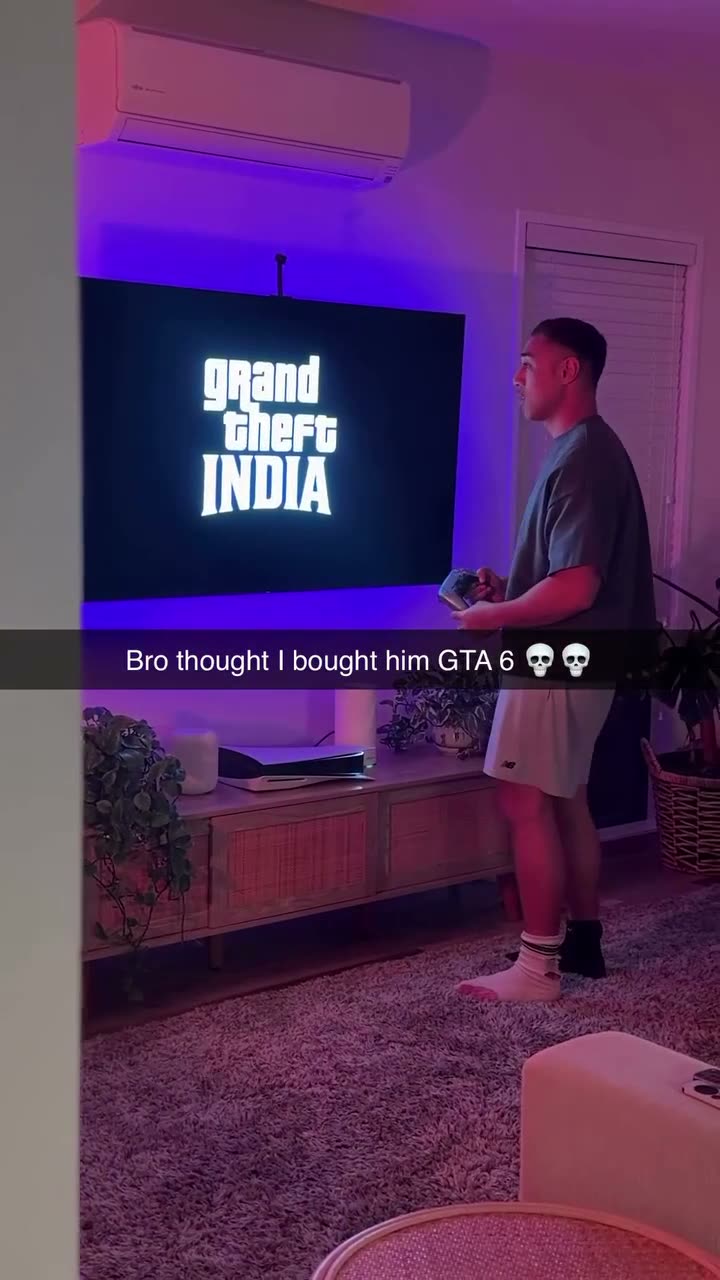
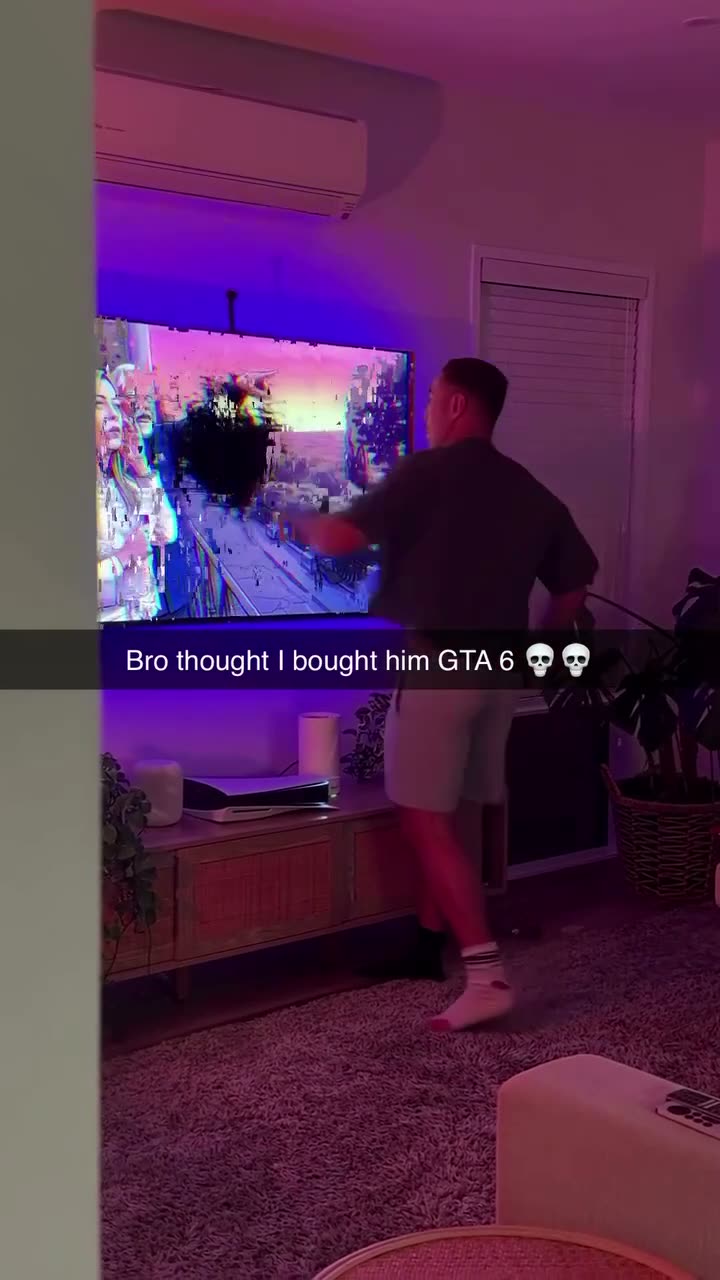
The Grand Theft India video is a 17-second vertical prank clip. A man dances in front of GTA 6 on his console, the screen goes black, a “grand theft INDIA” logo appears instead, and he throws his controller into the TV. The caption reads “Bro thought I bought him GTA 6”. The prank comes from creator Torrell Tafa, and the “India” ending comes from parodies of a GTA-themed political post on November 19, 2026.
The full story, including the political side, is in what Grand Theft India means.
How do you make it with an AI generator?
An AI generator holds the original clip and recasts the dancer with the person in your photo. You upload one photo, press generate and download the MP4. It is the fastest route, and nobody has to throw anything.
- Get your friend’s OK and a sharp photo of them, ideally head to toe.
- Open a Grand Theft India generator and upload the photo.
- Pick a quality and generate. A render takes a few minutes.
- Download the MP4 and post it with the GTA 6 joke in the caption.
The fake GTA 6 prank maker on this site works this way and keeps the clip’s sound, caption and TV smash.
How do you film the real GTA 6 India prank?
The real GTA 6 India prank needs a TV, a console controller, a fake title-card video and a friend who expects GTA 6. Most of the setup is editing the fake title card. The reaction is real, which is the whole point, so it cannot be redone.
- Make the fake title card. In CapCut or any editor, build a 15-second video: a few seconds of GTA 6 art, a cut to black, then “grand theft INDIA” in white on black. The Grand Theft Auto logo look is usually recreated with Pricedown, a free font by Ray Larabie.
- Get it onto the TV. Play it full screen from a USB stick in the TV’s media player, or cast it from your phone. Hide the phone’s controls before you start.
- Set up the camera. Prop a phone vertically where it sees both the TV and your friend from head to toe, and start recording.
- Hand over the controller and tell your friend the game is finally ready.
- Add the caption “Bro thought I bought him GTA 6” in the editor and post.
Do not encourage anyone to throw a controller. A real throw can crack the screen, pull the TV off its mount and hurt someone standing nearby. The smash in the viral clip is part of the joke, not a step to copy.
How do you make it with a video model and a prompt?
The prompt route needs a video model that takes a reference video plus a photo, such as Kling O3’s video-to-video edit mode. You upload the prank clip as Video 1 and your friend’s photo as Image 1. The prompt says that only the dancer changes, and that the TV screen and the caption stay as they are.
- Save the prank clip and trim it to the model’s maximum reference length.
- Upload the clip as the reference video and the photo as the image.
- Paste the prompt below and generate at the lowest resolution first.
- Check the caption and the TV screen. Models often blur or rewrite text, so you may need a retry.
- Lay the clip’s sound back on if the model returns a silent video.
Recreate Video 1 shot for shot. Replace only the young man who dances in front of the TV with the person in Image 1, in every frame.
Identity: keep the face, hair, skin tone, body shape and outfit from Image 1. Nothing about the original man is used.
Scene: keep the purple-lit living room, the TV cabinet, the plants and the rug exactly as they are.
TV screen: keep everything the TV shows exactly as in Video 1, at the same moments, including the logo screen, the artwork and the cracked screen at the end.
Caption: keep the white caption on its dark bar across the middle of the frame, unchanged and readable.
Motion: copy the dance, the stop, the stare and the controller throw with the same timing. The TV falls off its wall mount at the same moment.
Camera: keep the fixed vertical phone shot.
Do not add any new text, logos or watermarks.
Which way should you choose?
The right choice depends on what you want from the video. These conditions hold for one 17-second clip.
- Fastest, no risk to a TV: an AI generator. It needs one photo and a few minutes.
- A genuine reaction: the real prank. It needs a homemade title card and a friend who does not know.
- Your own version of the scene: a video model with a prompt. You control the wording, and you pay for every retry.
How do you post the Grand Theft India video?
Post the Grand Theft India video as a TikTok, Reel or Short with a GTA 6 caption, and mark it as AI-generated if it is. TikTok asks creators to label realistic AI-generated content. Reposts of the meme use #gta6 and #gta. Tag your friend only if they agreed to be in it.