How to Make the Flamingo Float AI Video (the Rooftop Pool “Hey Bro, Thank You” Trend)
How to make the flamingo float AI video from one photo: you drift off a rooftop infinity pool on a giant pink float. What happens, steps and sounds.
By Burning Bridges AI · Updated · 4 min read
What is the flamingo float trend?
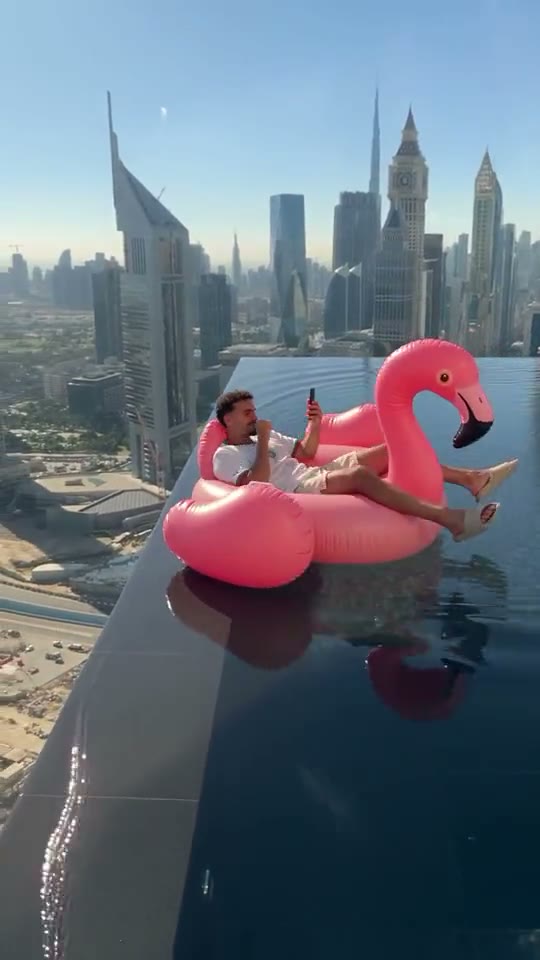
Picture the most relaxed person alive: lying back on a giant pink flamingo float, phone in hand, in a rooftop infinity pool dozens of floors above the city. A friend lunges to grab the float before it reaches the edge. They miss. The rider does not even look up, and drifts off along the glass edge toward the far end of the pool.
In the viral versions the friend shouts “bro, bro!” and the rider just answers “hey, thank you!”, which is why some people call it the “hey bro, thank you” video. Others call it the flamingo floatie trend or the infinity pool edge trend. AI versions that put anyone on the flamingo took off on TikTok in early November 2026. It is not the older “Flamingo” song trend or the Roblox trends with the same name.
What happens in the video, second by second
- 0 to 3 s, living the life: lounging on the flamingo next to the glass edge, legs out, scrolling the phone, the Dubai skyline behind.
- 3 to 5 s, the hand: a hand reaches in from behind the camera to grab the float, and misses.
- 5 to 11 s, the drift: the float slides along the infinity edge, smaller and smaller, to the far end of the pool. It never goes over.
How to make it, step by step
Step 1: Pick one photo
One person or one pet, face clearly visible, waist up or full body. The clip shows you lounging head to toe on the float. You keep the outfit from your photo, so summer clothes look closest to the original.
Step 2: Upload it in the generator
Open the Flamingo Float AI generator and drop the photo into the upload box. It replaces the man in the white T-shirt; the pool, the skyline, the flamingo and the hand stay.
Step 3: Generate
Pick standard, HD or Full HD. Every video is vertical like the original and 11 seconds long. Rendering takes a few minutes and you can close the tab meanwhile.
Step 4: Add a sound and post
The video comes without sound, like the clip it recreates. Save it, then add the trending flamingo float sound in TikTok or Instagram, or record your own “bro… bro… hey, thank you!” over it in CapCut. Tag the friend who would never have caught you.
CapCut template or AI prompt?
There are two other ways people make it. A CapCut template is quick, but it is the same stock clip for everyone, with your photo pasted in. A general AI video app can put you in the pool, but you write the prompt yourself — the float, the edge, the hand, the drift — and the AI often sends the float over the edge or skips the hand. The generator recreates the original clip with you in it, so the timing and the drift are right the first time.
Photo tips
- One person or one pet, not a group shot.
- Face the camera, face clearly visible, good light.
- Waist up or full body: the clip shows you lounging head to toe.
- Portrait or square crop, at least 341 px on each side.
- Only adults who agreed to appear. No minors or celebrities.
More one-photo trends: the Unforgettable Car AI reveal or the Money Flex AI cash flex.