The Coldplay Kiss Cam ChatGPT Prompt, and How to Get the Video
Copy-paste ChatGPT prompt for the Coldplay kiss cam meme image, a reference-video prompt for the clip, and the no-prompt way to make the video from two photos.
By Burning Bridges AI · Updated · 4 min read
What a kiss cam prompt has to get right
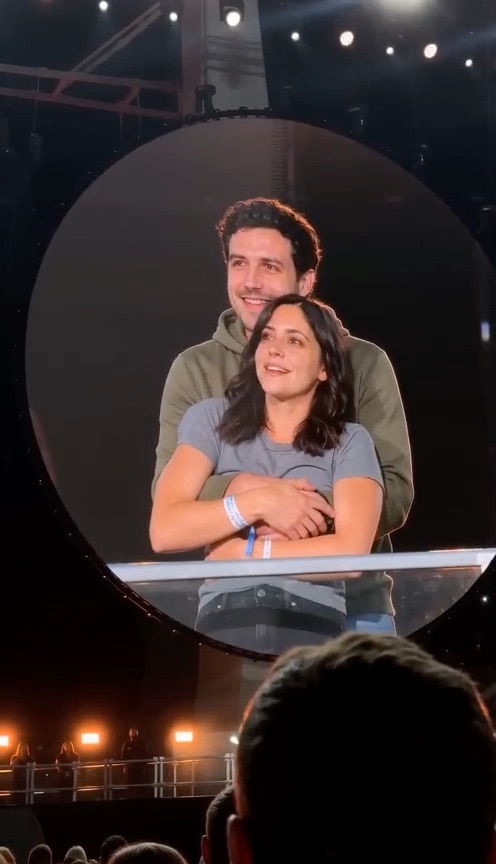
The meme only works if people recognize the scene at a glance and the faces at a second glance. A good prompt pins down three things:
- Who replaces whom. One person behind, hugging; one in front. Say which photo goes where, or the AI will guess.
- What stays. The round big screen with its glowing edge, the stage lights, the dark stadium and the heads of the crowd in the foreground. That framing is the joke.
- Faces from the photos. Ask for faces, hair and skin tone exactly as in the photos, and their own clothes, or you get generic lookalikes.
The ChatGPT image prompt (copy and paste)
Upload three images in this order: a screenshot of the kiss cam moment, a photo of the person who stands behind, and a photo of the person in front. Then paste:
Use image 1 as the scene: a concert kiss cam shown on a round stadium big screen, filmed on a phone from the crowd.
Replace the person standing behind with the person in image 2, and the person in front with the person in image 3.
Keep their faces, hair and skin tone exactly as in their photos; they wear their own clothes from their photos.
Keep the pose: the one behind hugs the one in front, both look up at the screen, surprised.
Keep everything else from image 1: the round screen, its glowing edge, the stage lights, the dark stadium and the heads of the crowd in the foreground.
Photorealistic phone photo, slightly soft focus, no text, no captions, no logos.
You get one picture of the two of you caught on the big screen. If a face drifts, reply with “make person 2’s face match image 2 exactly” rather than starting over.
The video prompt, for tools that take a reference clip
Video models with a reference-video mode (motion transfer or video edit) can recreate the clip itself. Upload the original clip as Video 1 and the two photos as Image 1 and Image 2, then use:
Recreate Video 1 exactly, replacing only the couple on the round concert big screen.
Image 1 replaces the one who stands behind, hugs the other, then ducks down out of frame.
Image 2 replaces the one in front, who turns their back to the camera and covers their face.
Keep each person's face, hair, skin tone and outfit from their own photo in every frame.
Keep the stadium, the round screen, the stage lights, the crowd and the handheld phone camera exactly as in Video 1, with the same timing.
No text, captions, logos or watermarks.
You have to find, download and trim the clip yourself, and most of these tools bill per second of video.
Why a prompt alone doesn’t make the video
Text-to-video models invent their own scene from your words. They can make “a couple on a concert kiss cam”, but not the duck, the turn and the timing everyone knows, and the faces rarely match. The moment comes from the original clip, so the model needs it as a reference.
Or skip the prompt
Coldplay Kiss Cam AI is that reference-clip workflow with everything preloaded: the stadium, the round screen and every move. Add a photo for the one behind and one for the one in front, pick standard, HD or Full HD, and press Generate. A standard video costs 100 credits, with packs from $9.90. The video is silent, so add the sound inside TikTok or Reels when you post.
Only use photos of people who agreed and are in on the joke. The meme is about being caught, and pinning it on real coworkers or exes can hurt them.