
Best Burning Bridges AI Video Generators in 2026: Free and Paid, Compared
The best tools to make the Drake Burning Bridges AI video, compared on price, original moves, song and photo support, plus which AI model each one uses and whether any are free.
By Burning Bridges AI · Updated · 7 min read
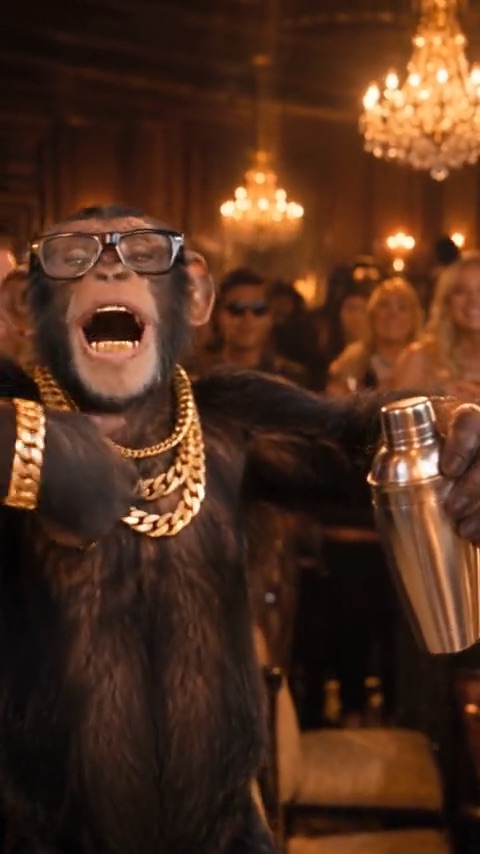
We build Burning Bridges AI, so we’re not neutral. To keep this useful anyway, every tool below is described from its own pages as of October 2026, and we say where something couldn’t be checked. Prices change often; check each tool before you pay.
What makes a good Burning Bridges AI generator
- It keeps the original moves and camera. The trend is recognisable because of four exact beats. Tools that only take a text prompt invent their own moves, and the “where she at?” gesture is usually the first thing to go.
- It replaces the whole performer. Face-swap filters only change the face; recasting also carries over your hair, body and outfit.
- It keeps the song. Otherwise you have to sync the music yourself.
- It accepts real photos. Some video models refuse photos of real people outright (see the model section below).
- You know the price up front, per video, before anything renders.
Burning Bridges AI generators compared
| Tool | How it works | Original moves? | Song | Price (Oct 2026) | Best for |
|---|---|---|---|---|---|
| Burning Bridges AI | One photo; the trend clip is preloaded | Yes, recasts the clip itself | Yes | 100 credits per video; packs from $9.90, no subscription | One photo, no editing, no app |
| Higgsfield Genjutsu | Upload a 4–30 s source clip plus reference photos | Yes, motion transfer | Not stated | About $2.00 (480p) to $7.20 (1080p) per 15 s | 1080p and full control over the source clip |
| CapCut templates | Pick a “Burning Bridges” template, add a photo | Varies by template | Usually | Depends on the template and your CapCut plan | Editing and posting in one app |
| Starrd | One photo in a mobile app template | Generated with Seedance 2.5 | Not stated | 150 credits per 20 s video | Making it on your phone |
| Media.io | Image + reference clip + copied prompt | Guided by the reference clip | Not guaranteed | Subscription; prices not listed on the page | People who like tweaking prompts |
| Prompt-only image-to-video | One photo and a text prompt | No, invents new moves | Usually not | Varies; some have free trials | Loose “inspired by” versions |
1. Burning Bridges AI
A website built only for this trend and a few others like it. The 20-second clip is already loaded, so you upload one photo of yourself or your pet, press Generate and download a vertical HD video with the song a few minutes later. It recasts the clip with a video-to-video model, so the moves and camera match the original frame for frame. Each video costs 100 credits; packs start at $9.90, with no subscription, and failed videos are refunded automatically. The trade-offs: output is 720p, and you can’t bring your own source clip. Step-by-step guide.
2. Higgsfield Genjutsu
Genjutsu is Higgsfield’s video-editing tool, and one of the earliest dated Burning Bridges swaps, a Threads post from September 19, 2026, credits it. It has two modes: Motion Transfer, which applies a source video’s movement to a new character, and Object Swap, which replaces one element of the shot. You upload the source clip yourself (4 to 30 seconds) plus up to 30 reference images, and output goes up to 1080p. Higgsfield’s own pricing example for a 15-second clip is 40 credits (about $2.00) at 480p, 104 credits (about $5.20) at 720p and 144 credits (about $7.20) at 1080p. Pick it if you want the highest resolution and don’t mind finding and trimming the clip yourself.
3. CapCut templates
Searching “Burning bridges” in CapCut’s Templates tab usually turns up a few one-photo templates. They’re the closest thing to free and you can edit and post without leaving the app, but templates are region-dependent and disappear often, and many of them generate a lookalike party room rather than reusing the original moves. Watch the preview before you use one.
4. Starrd
A mobile app with a Burning Bridges template: upload one photo and tap Create. According to its template page, it writes the prompt for you, generates with Seedance 2.5, and charges 150 credits for a 20-second video. We couldn’t confirm what a credit costs in money.
5. Media.io
Media.io’s Burning Bridges page gives you copyable prompts and a Motion Control workflow: upload your image and a reference clip, and the clip guides the moves, framing and timing. The page itself notes that a prompt alone doesn’t guarantee the original song or the signature gestures. Prices aren’t listed on the page; it’s sold as a subscription.
6. Prompt-only image-to-video generators
Any general image-to-video model can make a party video from your photo and a prompt like “walks into a chandelier-lit party and hypes up the crowd”. Some have free trial credits. But without the reference clip they invent new moves and camera angles, so the result reads as “inspired by” rather than the trend itself.
Which AI model is behind the Burning Bridges video?
The convincing versions come from video-to-video models: they take the trend clip as input, keep its motion, camera and lighting, and swap the performer for the subject of your photo. Higgsfield Genjutsu and Kling O3 Edit both work this way. Burning Bridges AI uses Kling O3 Edit, which in our tests kept the original moves exactly while replacing the performer with a real person’s photo.
Image-to-video models (prompt-driven) start from your photo instead and generate the motion themselves, which is why their versions drift from the original.
Can Seedance make it? It depends on the version. In our tests in October 2026, Seedance 2.0 Mini refused photos of real people on two different API providers, while Seedance 2.5 accepted them. Starrd’s template says it uses Seedance 2.5.
Is there a free Burning Bridges AI generator?
Not one you can count on. CapCut templates are the closest, and some image-to-video tools give a few free credits when you sign up, but neither reliably reproduces the original clip. Tools that recast the real clip run a heavy video model for every render and charge per video. If cost matters most, look for per-video pricing with refunds for failed renders, so you never pay for a video you can’t use.
Which one should you use?
- One photo, no editing, done in minutes: Burning Bridges AI.
- 1080p, your own source clip, more control: Higgsfield Genjutsu.
- Free-ish, all inside one app: a CapCut template, if a good one is available in your region.
- Your dog or cat instead of you: see how to put your pet in the video.